Signal — an intelligent notification system
The notification nightmare: “I can't stay on top of everything, but I also can't miss the important stuff.”
A team collaboration platform where the average user received 200+ notifications a day and 85% had switched push off entirely. Signal replaces on/off toggles with an importance framework, transparent AI prioritisation and correction the user actually controls — so it earns the right to interrupt, and explains itself every time.
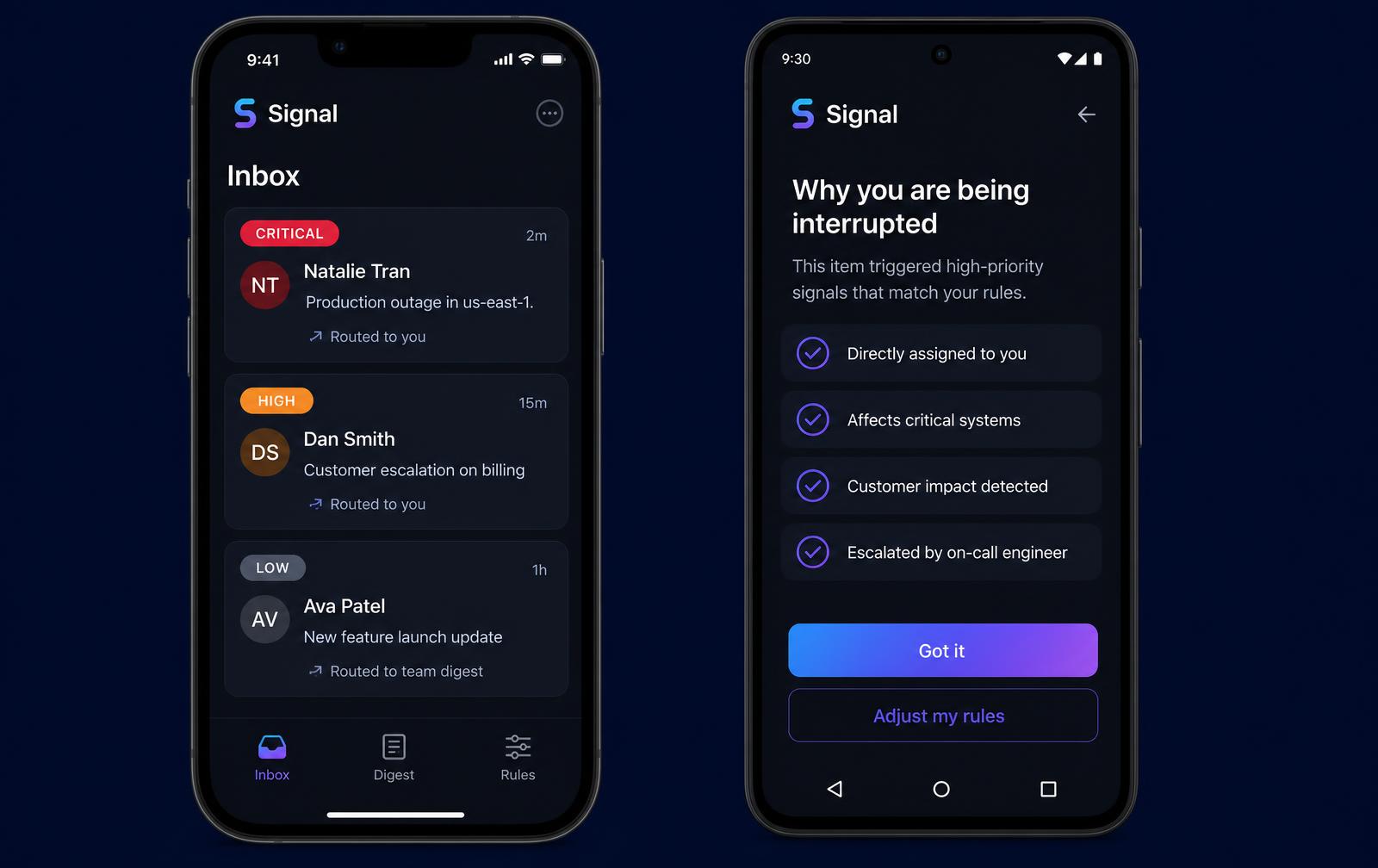
How the system decides what matters
Six mechanisms turn an undifferentiated firehose into a ranked, explainable stream — automated enough to work on day one, controllable enough that users never feel overruled.
A five-tier importance model
Critical, High, Medium, Low and FYI are defined by explicit rules — who is asking, whether you are blocking someone, whether a deadline exists, and whether the event needs any action at all.
Signals, not guesswork
Sender relationship and seniority, direct mentions, assignment and approval state, deadline language, thread participation and your own historical reply speed combine into one priority score.
Every decision is explainable
Each item carries a 'Why this priority?' answer in plain language with the signals that fired, so the system never feels like an unaccountable black box.
Correction as the control surface
Snooze, defer, 'less like this' and always-interrupt rules are the teaching interface. Users steer the model by reacting to real items instead of configuring settings screens.
Bundling instead of deleting
Low-priority events are never dropped — they are grouped by type and delivered as one scheduled digest, so nothing is lost and nothing pings.
Channel and quiet-hours routing
The priority tier decides the channel: push that breaks Do Not Disturb, in-app banner, quiet in-app badge, or an email digest — one rule set across mobile, desktop and web.
Explore the clickable prototype
A working slice of Signal on the phone. Switch between iOS and Android, move through the priority inbox, the “why you are being interrupted” screen and the daily digest, and flip Do Not Disturb to watch only critical items break through.
Signal on iOS and Android
A mobile-first product — the phone is where interruptions actually land.
- Critical9:41Layla Al Mansoori · CEO
Need the Q4 numbers ASAP for the board pack.
Push · breaks Do Not Disturb - Critical9:12Payments platform
Card authorisation errors above 5% in production.
Push + banner - High8:47Omar Haddad · Compliance
Approval needed on the onboarding policy today.
In-app · one reminder - LowRolling42 channels
88 reactions, 12 joins, 9 uploads.
Bundled into the 17:00 digest
Three tiers, one screen. Only Critical is allowed to make the phone ring.
- One glanceable list — priority is shown by label and position, never colour alone.
- Interrupt rules are per tier: push, in-app, badge or digest.
- Do Not Disturb holds everything except Critical, and says so on the card.
- Correction lives on the notification itself, not in a settings screen.
From challenge to outcome
The Problem
What We Learned
The Strategy
How It Was Built
Accessibility
The Impact
What I Carry Forward
Structure, flow & fidelity
How the product was organised, the path a user actually takes through it, and how the work travelled from scratch wireframes to a working prototype.
Information architecture
Priority inbox
- Critical
- High
- Mentions
- Assigned to me
Digest
- Daily bundle
- Weekly summary
- Resolved without me
- Archive
Controls
- Always interrupt
- Never interrupt
- Quiet hours
- Delivery schedule
Intelligence
- Why this priority
- Signals used
- Corrections
- Accuracy over time
User flow of the core task
- Step 01
Event arrives
Every notification is scored against explicit rules and behavioural signals.
- Step 02
Tier assigned
Critical, High, Medium, Low or FYI — with the reason recorded, not hidden.
- Step 03
Channel chosen
Tier decides push, in-app, badge or digest, and whether quiet hours are overridden.
- Step 04
User reacts
Act, snooze, defer or say 'less like this' directly from the notification.
- Step 05
Model corrects
Each correction updates the personal model and shows what changed.
Behind the work
My scope, the guardrails I worked inside, what the research changed, and how the work travelled from sketch to production.
My role & scope
Sole product designer with 5 developers, a PM and a tech lead: problem framing, the importance framework, research plan, IA, the control interface, the in-product notification experience and the transparency layer for the intelligence model.
Constraints & guardrails
- The brief was one sentence — 'reduce fatigue but never miss anything' — so the definition of important had to be designed, not received.
- Any change had to work across iOS, Android, desktop and web without a separate rule set per platform.
- Users had already muted push, so the design had to earn permission back rather than assume it.
- Cold start: new users and new hires have no behavioural history at all.
What research changed
- Muting was a rational response to unpredictability, not to volume — users could not tell in advance what a ping would be worth.
- The signals that best predicted importance were social, not textual: who sent it, whether you were blocking them, and how fast you normally reply to that person.
- Users accepted an automated decision far more readily when a one-line reason was attached to it.
The pivot
The first concept was a rich settings panel where users defined their own rules. Testing showed almost nobody configured it — the people drowning in notifications had the least time to tune anything. We inverted the model: smart defaults on day one, with correction happening inline on real notifications instead of in a settings screen.
UX metric → business impact
Root-cause map of notification volume, a five-tier classification matrix and a competitive teardown of Gmail, Slack and Linear.
Clickable prototype of the control interface: priority management, snooze and defer, quiet hours and digest scheduling.
Notification console with critical alerts, bundled digests, do-not-disturb overrides and the transparency panel.
Retrospective
Instrument the correction loop from day one; we added accuracy tracking late and lost weeks of evidence about which signals were actually mispredicting.
An intelligent system has to earn the right to interrupt — by being explainable, correctable and conservative about what counts as urgent.
“I turned push notifications back on for the first time in two years. It only pings me when it's actually my problem — and it tells me why.”